NQ, MNQ, ES and MES
From QQQ and SPX options, converted live to futures prices. Pick any of the four and the board and the charts show that contract's levels: a micro trades at the same price as its E-mini.
Live dashboard · no membership needed
The strikes where dealersDealersThe market makers on the other side of every option trade. They hedge all day, and that hedging is the flow this maps. carry the most gammaGamma exposureHow much forced hedging dealers carry at each strike. Big numbers mean their buying and selling moves the tape whether they like it or not., turned into NQ, MNQ, ES and MES levels on a live dashboard in the Echelon app. See where price tends to pinPinningHedging that leans against price near a heavy strike. Expect stalls, magnets and slow grinds instead of follow-through., where it tends to run, and which regimeRegimeWhich mode the tape is in. Positive gamma damps moves, so fades work. Negative gamma feeds them, so breaks keep going. the session is in, before the open.
Zones for the walls and the flip, the ten biggest gamma strikes ranked, and a one-line read of the regime. In NQ or ES prices, so nothing needs converting in your head.
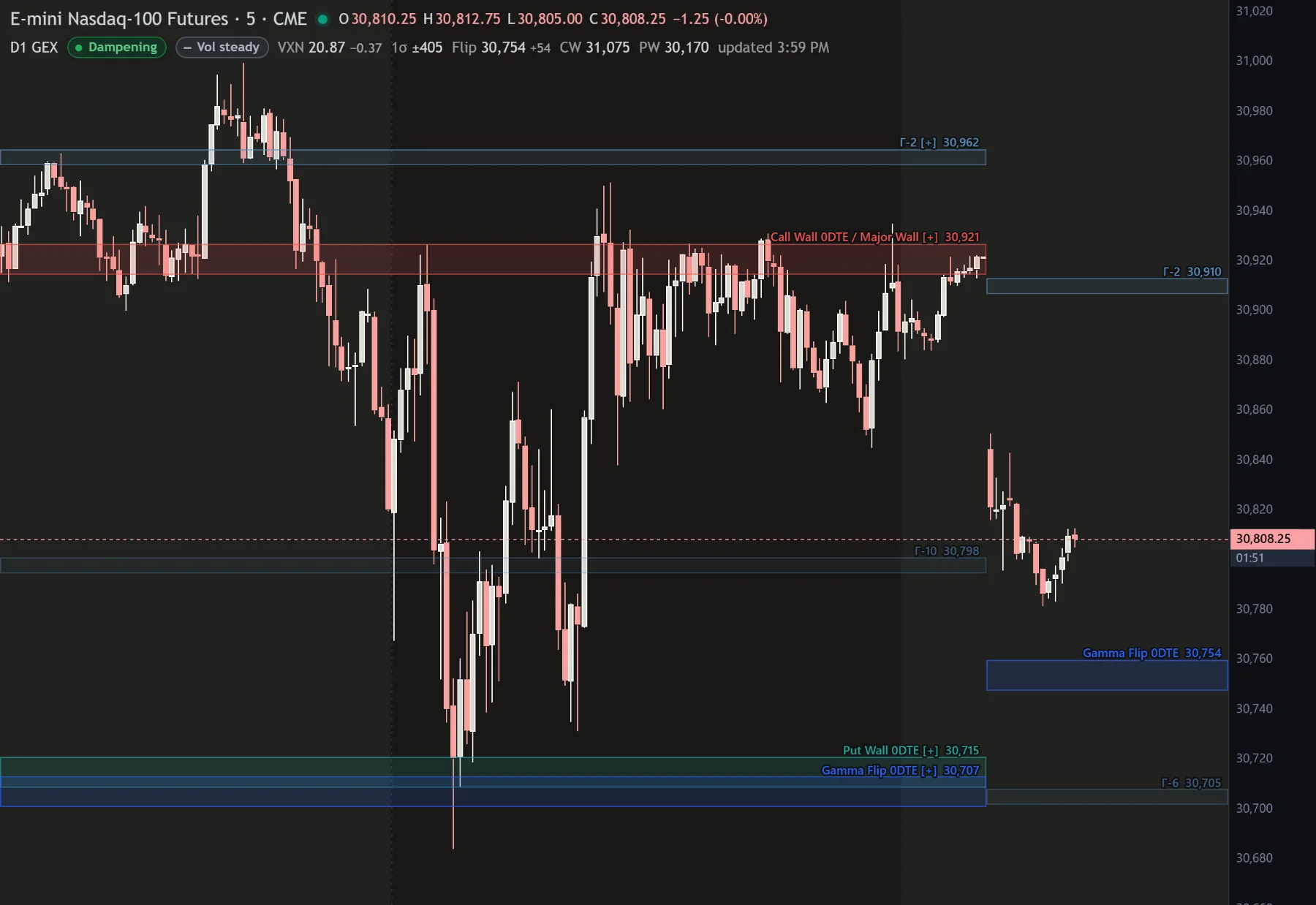
The heaviest call strike above and put strike below. Rallies tend to stall into the call wall, dips tend to get bought at the put wall.
Where dealer hedging changes sign. Above it moves get absorbed, below it they get chased.
The ten biggest gamma strikes, ranked, with [+] to [+++] for how heavy each one is. Levels on one price merge into one name.
Dampening or amplifying, in words, against live price. Context, never a signal.
From QQQ and SPX options, converted live to futures prices. Pick any of the four and the board and the charts show that contract's levels: a micro trades at the same price as its E-mini.
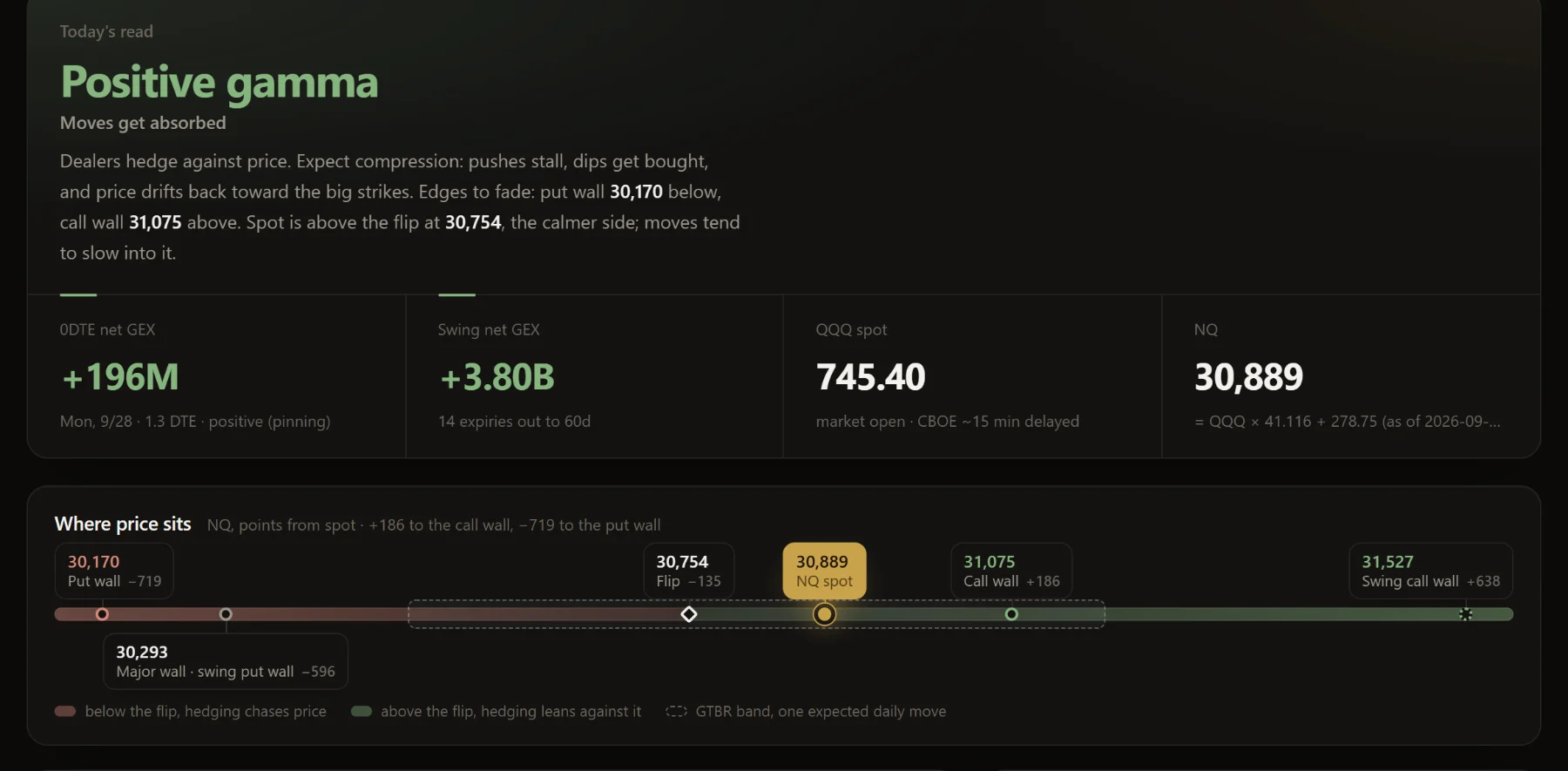
Positive or negative gamma and what that means for the session, rewritten on every print.
Every chart shows the time of its print. Old levels draw faded and dashed, so yesterday's never pass for today's.
NewThe options data the levels come from is delayed, so the levels are too. Price on the board is live; the walls are measured from it.
The same zones on Echelon's NQ and ES charts, switched on from the chart's indicator list, next to D1 LIT.
Every level of the day as plain text, ready for your notes or another platform.
Times are New York. The levels come from open interest, which changes overnight, so the morning book is the one that matters most.
Today's open interest lands and every level is rebuilt from it.
The pre-open book is on the dashboard and the charts.
Rebuilt on the session's own trades, with the time of the print beside it.
Rebuilt again as same-day gamma builds and burns off. Your alerts watch live price against the walls all session.
The closing book stays up until the next morning. If a print ever runs late, the board says the levels are old.
The same book on a dashboard: the regime, net gamma for 0DTE and swing, where price sits between the walls, and the full surface by strike and expiry. This is what you subscribe to.
Cancel any time; cancelling ends access at the end of the month you paid for.
After checkout, sign in to the Echelon app with the email you paid with and the GEX tab is there. Already an Echelon member? Subscribe from the app under Indicators. Questions before or after buying: d1fpc3@gmail.com.
Subscribe, then sign in to the Echelon app on the web, Windows or iPhone with the email you paid with. The GEX tab is on your account straight away.
NQ and MNQ, with levels from QQQ options, and ES and MES, from SPX options. Switch between them at the top of the board.
The board is rebuilt four times each trading day, at 8:20 AM, 10:00 AM, 12:30 PM and 4:20 PM New York, from delayed options data, so each print runs about 15 minutes behind the market. The 8:20 AM print carries the morning's fresh open interest. Every print says when it is from, and levels from an earlier day are marked old.
No. Since October 2026 D1 GEX lives only in the Echelon app, on the board and the charts.
No. D1 GEX is sold on its own at $35 a month. The membership does not include it; members subscribe from the app under Indicators.
No. Dealer positioning is modelled from open interest, never observed. Treat every level as a zone that needs price to confirm it, not a line that trades itself.